what_is_an_AI_server
Reading Time: 6 minutes

Developments in artificial intelligence are opening up new opportunities in various sectors, such as medicine, industrial automation, data analytics and marketing, and e-commerce. To support the processing of complex algorithms and machine learning, servers specifically designed for artificial intelligence are needed.

Artificial intelligence: a brief introduction

Artificial intelligence is a field of computer science that deals with creating systems and machines capable of performing tasks that require human intelligence. These systems can analyze data, learn from it and make autonomous decisions. AI can be divided into several categories, including machine learning, computer vision, natural language recognition and robotics.

Uses of artificial intelligence

Artificial intelligence finds application in numerous sectors and offers multiple benefits. Here are some examples of uses of artificial intelligence:

  • Medicine: AI can help in medical diagnosis, analysis of medical images, discovery of new drugs, and management of healthcare data.
  • Industrial automation: Artificial intelligence can improve the efficiency of industrial operations, optimize production and prevent failures and accidents.
  • Data analysis: Artificial intelligence allows large amounts of data to be analyzed quickly and efficiently, helping companies make more informed decisions and spot hidden patterns.
  • Virtual assistance: Artificial intelligence systems, such as virtual assistants, can answer user questions, provide information and perform specific tasks.
  • Marketing: AI can help with brand communication, SEO performance, value addition in the funnel stages, and content creation.

However, the use of AI requires specially designed servers that are capable of managing intensive and complex workloads. So let’s see what the characteristics of artificial intelligence servers are.

Server for AI: what you need to know

In the context of the development of AI, dedicated servers play a fundamental role. In fact, these are designed to manage the intensive and complex workloads required by AI algorithm processing and machine learning.

But let’s see some of the main considerations to keep in mind when choosing a server for AI:

  • Computing power: AI servers must be equipped with high computing power to handle complex algorithms and intensive workloads. High-performance multi-core processors, such as GPU and TPU processors, are often used to accelerate computing operations.
  • Memory and storage: Processing AI models require a large amount of memory and storage space. AI servers must therefore be equipped with an adequate amount of RAM and high-speed hard drives or SSDs.
  • High-performance networking: Communication between servers and data management requires a high-speed, low-latency network. The use of high-performance network interfaces, such as 10GbE or 25GbE connections, ensures reliable data transmission.
  • Cooling system: AI servers generate significant heat due to intense computing activity. Therefore, it is essential that servers are equipped with an adequate cooling system, such as fans and heat sinks, to avoid overheating.
  • Scalability: The ability to scale horizontally or vertically is important to adapt to AI processing needs. The ability to flexibly add or remove compute resources helps you manage evolving workloads.

To summarize, an artificial intelligence server is designed to provide the computing power, memory, networking, and scalability required to support advanced AI applications. Choosing a server suited to your specific AI needs is critical to achieving optimal performance and maximizing the potential of your AI applications.

Bhoost can offer you dedicated and AI-optimized hosting solutions capable of guaranteeing high performance and optimal security levels. Contact us for further information.

GPU server for artificial intelligence

The GPU server plays a key role in the development and processing of artificial intelligence. The GPU (Graphics Processing Unit) is a specialized device designed to accelerate parallel computing, making it particularly suitable for processing complex algorithms used in AI.

GPUs are made up of a large number of computing cores working simultaneously to perform operations in parallel. This parallel architecture allows you to perform compute-intensive tasks much faster than traditional processors.

In artificial intelligence, GPUs are often used to accelerate machine learning, especially the training of deep neural networks. Deep neural networks require a huge amount of computation, such as matrix multiplication and applying activation functions. GPUs can perform these operations in parallel on large amounts of data, significantly speeding up the training of AI models.

Using GPU servers for AI offers numerous benefits, including:

  • High performance: GPUs are capable of performing intensive calculations much faster than traditional processors, allowing for a dramatic increase in the performance of AI processing.
  • Scalability: Using GPU servers allows you to easily scale computing resources to handle evolving workloads.
  • Energy efficiency: GPUs are designed to be more power efficient than traditional processors, allowing you to achieve high performance with relatively little power consumption.

Importantly, not all AI workloads benefit from GPUs. Some algorithms and applications may require greater computational flexibility or a greater ability to handle large amounts of data sequentially. In these cases, other processing options, such as servers with traditional multi-core processors or servers with tensor processing units (TPU), may be preferable.

In summary, GPU servers are a powerful, high-performance solution for AI computing. Thanks to their high parallel computing power, they can accelerate machine learning and other artificial intelligence applications, enabling higher performance and reduced processing times.

AI server energy consumption considerations

Considerations on the energy consumption of AI servers are crucial in the current context of energy efficiency and sustainability. Given the high demands on computing power and long processing sessions typical of artificial intelligence, AI servers can consume a significant amount of energy and contribute to greenhouse gas emissions.

To face this challenge, some strategies can be adopted:

  1. Algorithm optimization: Optimizing AI algorithms to reduce processing time and the amount of calculations required can help reduce energy consumption. Reducing algorithm complexity and resource usage can lead to a better balance between performance and power consumption.
  2. Energy-efficient hardware: Using power-efficient hardware like low-power processors or specialized accelerators (e.g., TPUs) can reduce AI server power consumption. These components are designed to offer high performance with lower power consumption compared to more generic solutions.
  3. Efficient cooling: Implementing efficient cooling solutions can reduce overall system energy consumption. Optimized cooling systems reduce the energy needed to cool servers.
  4. Virtualization and consolidation: Using virtualization technologies can allow you to consolidate more workloads onto fewer physical servers. This can reduce overall energy consumption, as more efficiently used servers require less energy to operate.
  5. Energy monitoring and management: Monitor energy use and optimize power settings to reduce consumption.

Additionally, organizations can consider adopting renewable energy to power their servers for AI.
Bhoost has always cared about the environment and that’s why all the servers are 100% sustainable.
Using clean energy sources, such as solar or wind power, can help reduce the overall environmental impact of AI computing.

It is critical to carefully consider the energy efficiency of AI servers in order to reduce operational costs as well as the environmental impact of AI applications. Sustainability and energy efficiency must be considered as key elements in the design and use of AI servers.

Why is it important for security to have your own dedicated server for AI?

It is essential to have your own AI server to ensure the security of your data. When working with artificial intelligence, the data used to train models may contain sensitive or proprietary information. Relying on a shared server or cloud computing services may pose security risks, such as the possibility of unauthorized access or data breaches.

By having your own AI server, you can implement customized security measures to protect sensitive data. This includes adopting advanced security protocols, such as two-factor authentication, encryption of data in transit and at rest, as well as access rights management to ensure that only authorized individuals can access data.

Furthermore, with a proprietary AI server, you have more control over data management. You can establish data retention policies, and decide where it is stored and how it is used. This offers a higher level of security and privacy than shared or cloud-based solutions, where data can be managed by third parties.

Another crucial aspect is regulatory compliance. Having a dedicated AI server allows you to adhere to regulations and security requirements specific to your industry. This is especially important in highly regulated industries such as healthcare, finance or government, where data protection is of paramount importance.

Finally, a proprietary AI server offers the ability to carry out regular security audits and monitoring to detect any vulnerabilities or intrusions. In the event of a security incident, you can intervene quickly and take the necessary measures to protect your data and mitigate negative effects.

In summary, owning a dedicated AI server offers greater control, security, and privacy for the data used in AI. This is especially important when working with sensitive or proprietary data. Investing in a proprietary AI server can be a great solution to ensure data security and adhere to industry regulations.

In conclusion

Artificial intelligence is transforming the way we operate in numerous industries, from medicine to marketing to content writing. AI servers play a crucial role in this revolution, providing the computing power, memory and scalability needed to support advanced AI applications.

To achieve optimal performance for your AI applications, it is crucial to choose the right server, whether you opt for GPU servers or tensor processing unit servers. Additionally, security, energy efficiency, and sustainability are key considerations when configuring and using AI servers. As artificial intelligence continues to expand, the importance of AI servers will continue to grow in the future.

If you need an AI server, contact us and we will find the best solution suitable to your needs.

That’s it, folks! For more information, check out our blog.

Reading Time: < 1 minute

Are you ready for the DigiOn Canarias, one of the most interesting digital events in the Canary Islands?We at Bhoost do! It is with great pleasure that we will participate in this event which will be held on21 and 22 February 2024 in the Canary Islands.We are very excited and excited for this new adventure!It will certainly be an opportunity to have many professional meetings and to make Bhoost known even more to the Spanish and international market. On this occasion we will also propose all the solutions and innovations of Bhoost services.But it will also be a moment of discussion and networking digital issues, technological innovation and multi-channel.We will be present at the eventwith our stand. Come visit!We will be happy to talk to you abouthosting, performance, security, sustainability and much more.DigiOn: the digital event of the Canary IslandsAs mentioned, the second edition ofDigiOn Canaria will be held onFebruary 21st and 22nd, at the Gran Canaria Fair – Infect.DigiOn is theCorporate Digitalization Exhibition, where it will be possible to meet and discuss with some experts in the digital sector. This event aims to be a meeting point betweendigital solutions and technological innovation.To discover the complete program, visit the official page of DigiOn Canarias.Don’t miss the opportunity to participate in this fantastic event and have the opportunity to visit the beautiful Canary Islands.Participate in DigiOn for free and come and meet us!

Reading Time: 4 minutes

We at Bhoost ended 2023 with a year of exceptional growth and consolidation. Thanks to our team we were able to come up with a strategy focused on innovation and continuous improvement. Each of you helped us achieve extraordinary results in several key areas. We express our sincere gratitude with a heartfelt “grazie mille!” Together, we are confident of continued progress and success in the coming year. Let’s see a Bhoost recap of 2023!

Company growth

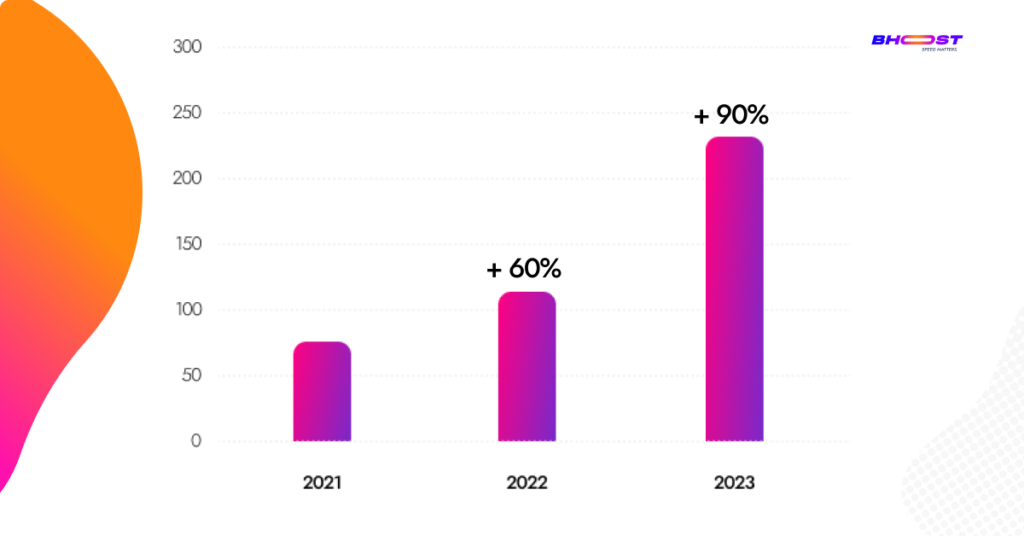
Bhoost has welcomed new clients and entered new markets, resulting in a notable increase in revenue. We achieved a remarkable 90% sales growth, proving the value of our marketing and client satisfaction.

Plus, Bhoost has welcomed new customers and smoothly introduced fresh brands into the scene. By handling new business areas with care, we’ve made sure Bhoost is a go-to for trustworthy and top-quality hosting services. We’re not just growing; we’re making sure your hosting experience stays top-notch.

Bhoost_webhosting_ecommerce

We have also established partnerships with major industry players such as Fabrico, E-commerce Schools, Digitag and others, thereby enhancing its network of strategic collaborations and ensuring scalability.

Product developments

At Bhoost we do listen. Your feedback drives us to constantly innovate and improve our products.  During 2023,  we introduced major updates, new features and improvements to ensure an even more powerful hosting experience.

The launch of the consultancy for SpeedUp performance optimization stands out among the major product innovations. With the help of this smart solution, clients were able to greatly enhance user experience and page loading speed on their websites.

Bhoost_e-commerce

Additionally, we developed a custom solution called PerformUltra for cloud-level infrastructures. This solution has allowed companies to make the most of the potential offered by the Cloud, guaranteeing high performance, security and scalability.

Sustainability and green initiatives

Bhoost has made major progress in the reduction of environmental impact and initiated sustainable partnerships. We have adopted eco-friendly practices, invested in low-impact technologies and promoted energy efficiency.

Bhoost recap 2023

Moreover, Bhoost has taken steps to spread the word about the importance of sustainability and making websites work better. We’ve organized various initiatives to make sure people know why it matters.

Customer satisfaction and feedback

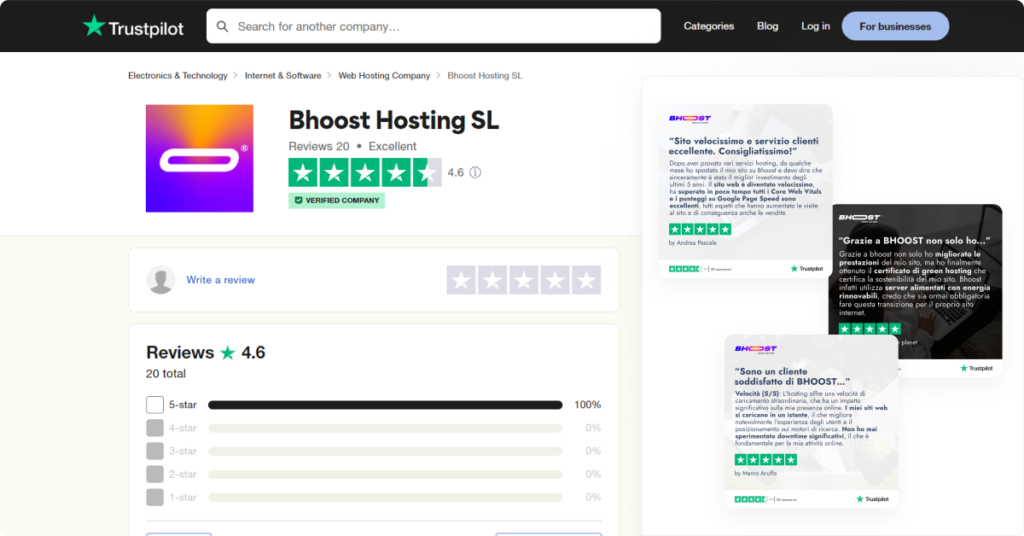
Making customers happy has always been at the top of our list at Bhoost. During 2023, the company received over 20 positive reviews on Trustpilot, with an average rating of 4.6. This simply tells us that at Bhoost, we’re doing our molto bene to provide top-notch services, and our customers appreciate it. Your trust means a lot to us.

You can read reviews on Trustpilot by clicking here.

Bhoost recap 2023 web_hosting_e-commerce

Company culture and team

At Bhoost, we didn’t just see growth in numbers; our team and company culture blossomed too. In 2023, we proudly opened a new office in Gran Canaria, giving our fantastic team a fresh, inspiring place to work—a space that’s as modern as it is motivating.

Bhoost recap 2023 web hosting

The Bhoost team didn’t just expand; it became a tight-knit family of 6 incredible individuals – Andrea, Manuela, Raul, Nicola, Karol, and Ruggero. This passionate and experienced crew played a vital role in driving our company’s success and growth.

Future plans and initiatives

Enough about Bhoost 2023 recap; let’s dive into our aspirations for the future! Bhoost is getting ready for some really interesting ideas that will emphasize sustainability, global expansion, and promoting the online performance culture.

We’re dedicated to ramping up our efforts in environmental sustainability, with initiatives like tree planting and embracing eco-friendly practices at the forefront of our agenda.

Moreover, our sights are set on international horizons. Bhoost will be extending its hosting services to Spain and working towards broadening its footprint across Europe.

Finally, Bhoost will continue to promote the culture of web performance by providing resources and events that help companies improve the performance of their websites.

We also aim to expand our collaborations with Partners who share our same principles and our commitment to providing an always efficient and punctual service.

We want to increase the initiatives that concern us and that aim at a culture of performance because these have now become the focal point of the success of a business.

Among these the most interesting collaborations and initiatives stand out Digital 1-1, a networking event dedicated to the digital sector, which takes place in an exclusive environment and offers high-quality connection and collaboration opportunities. For years, this event has been a huge success in Spain and will now arrive in Italy in October too.

Another initiative not to be missed is i webinar su Learnn, which will provide users with valuable tools and advice to improve their hosting strategies.

Bhoost_online_web_hosting_ecommerce

Conclusions

At the end of the Bhoost 2023 recap, we can say that we had an incredible year filled with significant growth and accomplishments. Our success isn’t just ours; it’s because our awesome customers support us and are happy with what we do. We’re forging ahead in the new year, offering cutting-edge hosting solutions while prioritizing customer satisfaction and environmental sustainability. We’re truly excited about what’s to come! As we wrap up, we wish everyone a New Year filled with happiness, health, and prosperity!

Here’s to the adventure ahead, together!

That’s it, folks! Check out our blog for more information.

Reading Time: 4 minutes

Core Web Vitals are a set of metrics that measure user experience on the web in terms of loading speed, interactivity and visual stability.

The performance of a site is in fact fundamental to its success and this, as mentioned, not only guarantees an optimal user experience but also for the positioning of the site in search engines.

In fact, with the introduction of Core Web Vitals, a website must pay close attention to the factors that influence the user experience, because this contributes to its positioning in search engines and therefore to its visibility.

But how do Google Ads ads impact these metrics? In this article, we’ll explore Google Ads’ impact on Core Web Vitals and where it could hinder you from exceeding those metrics.

Google Ads and traffic

To understand how Google Ads impact Core Web Vitals, it’s important to consider the traffic generated by ads. When a Google Ads ad is clicked, the visitor arriving at the site is included in the Core Web Vitals evaluation. This means that traffic from Google Ads contributes to the overall evaluation of these metrics.

Barriers to Overcoming Core Web Vitals

Impact of Google Ads on TTFB (Time To First Byte)

TTFB is a metric that measures the time between a request for a resource and the time the first byte of a response begins to arrive.

There are some situations where Google Ads can hinder passing the Core Web Vitals.

One of the main situations is when 80% of a site’s traffic comes from Google Ads. In these cases, the time to first byte (TTFB) may be slower. This is because TTFB is affected by the loading speed of your ad landing pages.

If the user’s first experience through an ad is subpar, this can have a negative impact on the user experience, increasing the bounce rate and therefore affecting conversion. At the same time, a slower TTFB can negatively impact Core Web Vitals and therefore the site’s SEO.

Strategies for dealing with these problems

There are a few strategies that websites can adopt to address issues arising from Google Ads and Core Web Vitals. For example, it is important to make sure you have a correct caching strategy for visitors who arrive through ad clicks. It is possible that the absence of a proper caching strategy could significantly increase the TTFB for these visitors.

Another situation that can affect Core Web Vitals is the waiting time for a query string. Often, when a click on an ad leads to a redirect to a landing page, the wait time for the query string can increase significantly. This can lead to a strongly regressed TTFB. In these cases, it is important to adjust your business expectations regarding TTFB if ​​you rely heavily on Google advertising traffic.

Another option to consider is enabling parallel tracking for Google Ads. This option will improve the TTFB of your ad landing pages, as well as the First Contentful Paint (FCP) and Largest Contentful Paint (LCP). Parallel tracking allows customers to go directly to the landing page, while click measurement happens in the background.

Impact of Google Ads on CLS (Cumulative Layout Shift)

The CLS is a metric that measures all the layout changes of your site as it loads. In essence, it quantifies the elements that move or change during the page loading.

An example that we reported in our article on Core Web Vitals, to better understand this metric is to access, for example, an online smartphone store. If by clicking on a product, instead of being redirected to the product sheet, you enter a different tab, with a different layout, this can certainly disorient you.

Well the CLS measures precisely this type of change and interaction.

Ads can influence this metric because they can move content on a page if there isn’t enough space for them. This aspect can therefore become very unpleasant for the user, who thus sees the contents moved in an unexpected way.

This type of behaviour can occur for three main reasons:

  1. If the ad area expands or collapses
  2. If you use flexible ad slots, meaning they automatically resize based on the creative
  3. If you use multiple ad slots

So when designing Ads, take these aspects into consideration, so you can guarantee the right user experience. Essentially this factor measures the interactivity and responsiveness of your site.

Impact of Google Ads on FID – First Input Delay

The TRUST is a metric that measures all user interactions that occur on the site when it is still loading.

Regarding ads, if these are responsive or video ads, for example, these can negatively impact the FID. In fact, for example, if the page or advert is poorly viewed or takes too long to be visible, the FID score may be penalised.

Associated with the FID, or rather, we can say an evolution of it, it is also the INP (Interaction Next Paint), which will be an integral part of the process from March 2024. This new metric measures the time a user takes to interact with a page after it has been loaded.

Strategies for dealing with these problems

In order to resolve problems related to FID, you can:

  • Remove some unused and useless JavaScript libraries
  • Load ad tags asynchronously
  • Overall improve the performance of your site

Impact of Google Ads on LCP – Largest Contentful Paint

Per LCP, we mean the time it takes for the heaviest content to actually appear on the screen.

Advertisements, especially those that are larger than other elements, can have a negative impact on the LCP.

Strategies for dealing with these problems

  • Move large ads to the “below the fold” area (the part of the page that the user can only see if they scroll down the page.)

Benefits of Core Web Vitals on Google Ads

Core Web Vitals contributes to better results in PPC campaigns on Google Ads. Your landing page experience quality score can directly influence your bid for a particular position. Improving the technical experience can lead to a significant reduction in cost per click (CPC), up to 20-25%. Additionally, better page loading speed can benefit your automated bidding strategy.

Conclusions

Core Web Vitals are an important aspect of user experience on the web, and Google Ads can influence these metrics in various ways. It is essential to understand the impact of ad clicks on your Core Web Vitals rating and take appropriate strategies to address any issues.

Optimizing the technical experience of the site can lead to better results in advertising campaigns and improve the overall user experience.

FONTE: headerbidding

That’s it, folks! Check out our blog for more information.

poor performance
Reading Time: 6 minutes

When it comes to website performance, it’s common to wonder if poor scores are attributable to the hosting or developer. In fact, both can impact a site’s overall performance. In this article, we will look at the different factors that can cause poor performance scores and discuss both the role of the hosting and the developer in improving site performance.

Let’s start by talking about the hosting. The hosting of a website plays a vital role in determining the overall performance. If the hosting is low quality or not optimized for the specific needs of the website, this may cause a slow server response, long loading times, and an overall poor user experience. Some key factors to consider for good hosting include server speed, availability, scalability and security.

However, it’s not just hosting that affects website performance. It too developer has an important role. A competent developer should follow best web development practices to optimize code, reduce resource burden, minimize server requests and improve the overall user experience. Through the use of caching, resource compression, image optimization and other techniques, a developer can greatly improve website performance.

So, who is responsible for poor performance scores? Let’s delve deeper into the discussion in this new article.

Why should I care about bad performance/structure scores?

First, we ask ourselves why we should actually care about site scores and performance. For starters, these greatly affect the user experience. In fact, a slow website leads to a negative user experience. Not only is this because those who visit it do not have an immediate response to their requests (for example completing a purchase, seeing a product page or specific content), but it also gives a sign of unreliability and insecurity.

So here we go with the introduction of metrics Core Web Vitals, Google has also shown that it pays a lot of attention to these aspects. In fact, the performance score essentially represents the experience of your visitors into key user-centric metrics (e.g. Web Vitals) as your page loads. More the lower your performance score, the worse your page will perform from the point of view of your visitors. Factors like location, network connection speed, and more (ads, cookies, etc.) can also impact how your page loads, which in turn affects your performance score.

poor performance

Facility score

On the other hand, a negative structure score means your page probably wasn’t built with the best front-end practices in place. There are numerous strategies and methods for implementing a website to ensure an optimal loading time, and with a poor structure score, chances are your website has none of them in place.

Your performance on the Facility Score does not necessarily correlate with your Performance Score. However, improving your structure score can be a good starting point for improving your overall page load times (which can potentially impact your performance score). Overall, getting better results can not only improve your visitors’ experience on your page but will also likely lead to more conversions and potentially improved SEO rankings as well. This means that improving your scores has tangible benefits for your website/business/operations.

What are the causes of poor performance/structure scores?

Not reaching thresholds for any of the 6 performance metrics:

  • First Contentful Paint (FCP)
  • Largest Contentful Paint (LCP)
  • Speed Index (SI)
  • Time to Interactive (TTI)
  • Total Blocking Time (TBT)
  • Cumulative Layout Shift (CLS)

it doesn’t just mean having a site that doesn’t perform optimally, but as we also said in our article dedicated to Core Web Vitals, it also means penalizing him. This is why it becomes essential to be able to have a site that responds quickly and performs.

But what does not achieving a satisfactory score on these metrics depend on?

Many of these parameters are directly related to CSS/JavaScript execution, code or image optimization, but also hosting and other features.

But let’s see in detail what can actually negatively affect our site.

Reasons for Incorrect Structure Scores:

There are several reasons why a site might be slow and not meet the Core Web Vitals score:

  1. Image optimization: Non-optimized images can slow down page loading. It is important to resize, compress, and use appropriate image formats to improve performance.
  2. Code not optimized: Inefficient, heavy, or buggy code can negatively impact site performance. It is important to write clean, efficient and well-structured code to improve loading speed.
  3. Cache and storage: Proper cache configuration and use of caching techniques can reduce page loading time. Using browser caching and implementing a server-side cache can improve overall site performance.
  4. Low-quality hosting: A low-quality hosting service can negatively affect the performance of your site. If the hosting does not provide enough resources or has a slow connection, the site may be slow.
  5. Heavy plugins and scripts: Excessive use of plugins or heavy scripts can slow down page loading. It is important to carefully evaluate your use of plugins and scripts and ensure they are optimized for performance.
  6. Slow network connection: Page loading speed also depends on the user’s network connection. A well-optimized site may still be slow if the user has a slow connection.
  7. Server performance: Server performance may affect overall site performance. An overloaded or resource-constrained server may cause slow response times.
  8. Page size and complexity: A page with many elements, scripts, or heavy media may take longer to load. It is important to reduce page complexity and optimize content to improve performance.

These are just some of the factors that can affect the performance of a website. It is important to identify and resolve specific causes to improve your Core Web Vitals score and provide an optimal user experience.

Hosting or developer?

The question therefore arises: “Should I contact my hosting provider or developer?”

There is no simple answer as it depends on who is responsible for your poor performance/structure scores.

Contact your hosting provider

  • you have a long TTFB
    If a long TTFB due to slow server response is the reason for your poor performance/structure scores, it is most often the case that underperforming servers/lack of server resources are the cause. However, keep in mind that poor/inefficient backend code could also be responsible for this, in which case you may need developer assistance.
  • See Problems CDN:
    If your poor results are caused by CDN problems, contact your CDN provider (in some cases, it turns out to be the same as your hosting provider).

Contact your developer

  • You have unoptimized images/videos
    If your poor results are caused by too many unoptimized images (or videos), you will need to contact your developer as this is purely a front-end design issue.
  • Have CSS/JavaScript not optimized?
    When CSS and/or JavaScript are responsible for your poor scores, you will need to ask the developer for assistance as this is also a front-end issue. While reducing your website’s CSS/JavaScript code naturally helps improve performance, you should take care to ensure that essential code is not eliminated. Reducing unused CSS/JavaScript should therefore be a priority to ensure the browser isn’t processing potentially expensive code that isn’t even needed on the page.
  • Caching must be configured
    Finally, if you want to set up caching, you can do it yourself (for WordPress users) or contact your developer to have it set up for you. Please note that your poor results could also be due to a combination of the reasons above. In this case, we recommend addressing the most critical issues first and then addressing the rest based on feasibility.
  • Third-party scripts are problematic
    Suppose your poor scores are caused by third-party content. In that case, you should contact your developer only after you have reviewed your site’s third-party content, determined which requests are negatively affecting your performance, and removed those that do not add value to your business. A developer can then potentially assist with additional optimization opportunities for required third-party requests.

Essentially then, you should contact your hosting provider for TTFB and CDN issues (only if your hosting provider is the same as your CDN provider). However, you can contact your developer for all other front-end issues displayed in the Structure tab.

We recommend working on the critical issues first (long TTFB, Top Issues in the Summary tab) and taking care of the rest later.

Conclusion

Poor performance/structure scores can be caused by a myriad of performance issues on your page, both back-end and front-end. This means that your visitors are probably not having a good experience on your page and you therefore need to intervene.

If you need performance monitoring on the hosting side, contact us and we will find the best solution for your needs.

That’s it, folks! Check out our blog for more information.

ecommerce-prestashop-checklist
Reading Time: 4 minutes

Prestashop is an open-source e-commerce platform that allows you to create professional and functional online stores. With Prestashop, you can open your online store quickly and easily, offering your customers a convenient and safe online shopping experience.

The platform offers a wide range of features and tools to manage all e-commerce-related activities, including the management of products, payments, shipping and marketing. With Prestashop, you can customize the look of your shop, choosing from a wide selection of themes and add-on modules.

Prestashop is highly flexible and scalable, allowing you to grow your online store according to your needs. You can manage an unlimited product catalogue, offer multiple payment and shipping options, and use advanced marketing tools to promote your store.

open prestashop e-commerce

Opening an online store with Prestashop is an excellent solution for those who want to enter the world of e-commerce in a professional and effective way. By following the correct steps and recommendations, you will be able to open your Prestashop shop in no time and offer your customers a high-quality online shopping platform

So we have collected for you some interesting indications for opening an e-commerce with Prestashop.

In particular, we have created a checklist with all the most useful information.

Enjoy the reading!

10 Steps for opening an online shop with PrestaShop

Laying the Foundation

Choice of hosting: To open your Prestashop shop, the first thing to do is choose reliable and high-performance hosting. Quality hosting is crucial to ensuring that your online store functions properly and is accessible to users.

    Bhoost can be of great help to you in this because it offers specialized services for Prestashop. Be sure to evaluate the options available and choose the one that best suits your needs.

    If you need advice, contact us and we will find the solution that best suits your needs.

    Prestashop installation: Once you have selected the hosting, you can proceed with the Prestashop installation. This open-source software is designed specifically for building online stores and offers a wide range of features. Follow the instructions provided by your hosting provider to correctly set up your hosting environment and install Prestashop on your domain. Make sure you follow each step carefully to avoid errors and problems during installation.

    Initial configuration: After installation, it is important to carry out some initial configurations to customize your Prestashop store. Login to the Prestashop control panel and start setting the basic settings. These include store language, currency, payment and shipping methods. Make sure you choose the options that best suit your target market and your specific needs.

    Designing Your Shopfront

    Selecting a theme: Prestashop offers a wide range of customizable themes for your store. Choosing a suitable theme it’s important to create an engaging visual experience for your customers. You can select a predefined theme or customize one based on your aesthetic preferences and the industry you operate in. Prestashop also offers the possibility of using premium themes for an even more professional look.

    Adding Your Products

    Loading products: Once your Prestashop store is set up, it’s time to upload the products you want to sell. Be sure to provide accurate descriptions, high-quality images and competitive prices to attract potential customers. Organize your products into categories and subcategories to simplify navigation and make it easier for customers to find what they are looking for. Prestashop offers intuitive tools to manage your product catalogue efficiently.

    Enabling Transactions

    Configuring payment methods: A key aspect of the success of your online store is the ability to deliver to customers different payment options. Prestashop supports a wide range of payment methods, including credit cards, PayPal, bank transfers and others. Set up the payment methods you want to offer your customers and make sure you test them thoroughly to ensure they work properly.

    Setting Up Delivery

    Configuring shipping methods: Decide which shipping methods to offer your customers to ensure their orders are delivered efficiently. You can offer options such as express delivery, priority mail or in-store pickup. Make sure you set your shipping rates correctly based on the weight, size of your products, and destination. Prestashop offers tools to manage shipping options in a flexible and personalized way.

    Optimizing for Findability

    SEO optimization: To increase the visibility of your Prestashop store on search engines, it is important to optimize your product pages and descriptions using relevant keywords. Do thorough research on the most relevant keywords for your industry and make sure to use them strategically in your store content. Also, create a URL structure friendly to improve your online visibility.

    Preparing for Launch

    Test and launch: Before officially launching your Prestashop shop, it is essential to execute extensive testing to verify that all features are correctly implemented and that the store is ready for customers. Test site navigation, purchasing process and all other relevant aspects to ensure a smooth user experience. Fix any errors or issues found during testing and make sure everything is working properly before launch.

    Spreading the Word

    Promotion of your shop: Once your Prestashop shop is online, it is important to promote it to attract traffic and customers. Use digital marketing strategies such as social media, online advertising and email marketing to increase your store’s visibility and generate sales. Create interesting and engaging content, collaborate with industry influencers and offer special promotions to attract the attention of potential customers. Monitor the results of your marketing campaigns and make any changes to optimize the results.

    Bonus: Maintaining Your Online Presence

    Performance monitoring: Use analytics tools to monitor the performance of your online store. Analyze key metrics such as number of visits, conversion rate and average order value to identify areas for improvement and take strategic decisions.

    Regular updates: Keep your online store updated with new products, special offers and interesting content. Offering a reason for customers to return to your store can contribute to long-term success

    By carefully following these steps, you will be able to open your Prestashop e-commerce in no time and start selling your products online. Remember that running an online store requires commitment and constant attention to maintain long-term success.

    That’s it, folks! Check out our blog for more information.

    Reading Time: 6 minutes

    WordPress is an open-source content management platform (CMS) that allows users to create and manage websites easily and efficiently. It is one of the most popular CMS systems in the world and is used for a wide range of websites, including blogs, news sites, business sites, e-commerce, and much more.

    WordPress offers an intuitive and user-friendly interface that allows users to add, edit, and publish content to their site quickly and easily, without the need for advanced programming or design knowledge.

    The flexibility of WordPress allows you to customize the look and functionality of the site using themes and plugins. Themes allow you to change the look of your site with ease, while plugins add extra features like image galleries, contact forms, SEO optimization and much more.

    WordPress_super_fast

    WordPress is widely used because it offers numerous benefits. It is highly customizable, scalable and supports a wide range of features. Additionally, WordPress is search engine optimized, meaning that sites built with WordPress tend to have good visibility in search results.

    Furthermore, WordPress is an ever-evolving platform with a large community of developers and users who contribute to the development and improvement of the system. This ensures that WordPress remains up-to-date, secure, and at the forefront of the latest trends in web design and development.

    In summary, WordPress is a powerful CMS platform that allows users to create and manage websites easily and effectively. It is suitable for any type of website and offers numerous advantages in terms of flexibility, customization and search engine optimization.

    If you’re looking to Timing the speed of your WordPress site, you made the right choice. A fast site not only improves the user experience but can also have a positive impact on search engines and conversions. In this article, we’ll explore some strategies and best practices for making your own WordPress super fast.

    15 Tips on how to improve your speed

    1. Choose quality hosting

    To ensure a fast and reliable experience for your site visitors, it is essential to choose quality hosting. With reliable hosting and high performance, it will have fast servers, adequate support, and scalable infrastructure. Make sure you do thorough research and choose a provider that meets your needs.

    In fact, hosting can negatively or positively influence SEO and have a really important impact on the speed of your site.

    Did you know that if a website is too slow, more than 40% of visitors will leave and never return? This is not only a matter of having the sought-after content immediately available but also of the image we are giving to the user. An image of lack of seriousness and unreliability.

    This is why all of Ghost‘s shared and VPS hosting services are highperformance and speed-oriented. This way, even during peak visits, you will have peace of mind that your site will respond well and quickly.

    2. Use a lightweight and optimized theme

    The choice of the right theme can make a difference in the speed of your WordPress site. Choose a light and well-optimized theme over one with a lot of unnecessary features. A lightweight theme will reduce page loading time and improve overall site performance.

    So be careful with the free ones because they are not always optimal from a performance and SEO point of view. Sometimes it is better to pay a small amount (we are around €40) but be sure to have a theme that does not weigh down the site and does not make it slower.

    3. Optimize images

    The Images can significantly slow down your WordPress site. Make sure you optimize your images before uploading them to the site.

    This factor is very important because images heavier than 100 KB can really impact the weight of the page and make it slow and inefficient.

    Use image compression tools to reduce file size without compromising visual quality. Also, consider using lighter image formats like JPEG instead of PNG.

    4. Use a cache

    A cache is a tool that temporarily stores the pages of your site to make them quickly available to subsequent visitors.

    As you can see, this tool is extremely useful if our page contains a large amount of content, such as high-quality images or code files. In fact, these contents may take some time to load. With the cache, we solve this problem since this tool makes a temporary copy of the contents. This means that they do not have to be requested again from the server where the site is hosted, thus saving time.

    Using a caching plugin, such as WP Super Cache or W3 Total Cache, can significantly improve the loading speed of your WordPress website. Configure the plugin correctly to maximize results.

    5. Minify CSS and JavaScript files

    CSS and JavaScript files can become cumbersome and slow down your website. Use tools minification to reduce the size of these files by removing white spaces, comments and unnecessary characters. Also, consider using asynchronous or deferred loading methods to further improve performance.

    6. Update WordPress and plugins

    Maintaining WordPress and updating plugins is critical to ensuring the security and performance of your website. Regular updates include bug fixes, performance improvements, and security patches. Make sure you update regularly to make the most of the latest versions available.

    7. Monitor your site’s performance

    In the end, monitor your site’s performance regularly using tools like Google PageSpeed Insights and GTmetrix. These tools will give you an overview of areas that can be improved. Use this information to make any necessary optimizations and continue to keep your WordPress super fast.

    8. Optimize your HTML code

    It is important to optimize images, CSS, and JavaScript files. Also, pay attention to your WordPress site’s HTML code. Minimize the use of unnecessary tags, avoid excessive nesting of elements, and make sure your code is valid and well-structured. Clean, lightweight HTML will help improve the overall performance of your site.

    9. Use a Content Delivery Network (CDN)

    A CDN (Content Delivery Network) is a system of servers distributed around the world that can store and deliver your site’s content more efficiently. By using a CDN service like Cloudflare or MaxCDN, you can improve page loading speed, reduce latency, and provide a better experience to users from different parts of the world.

    10. Limit the use of unnecessary plugins

    Even if plugins can add interesting features to your WordPress site, excessive use of plugins can slow down performance. Periodically check the plugins installed on your site and disable or remove those that are no longer necessary. Keep only plugins essential for the functioning of your site and look for lightweight alternatives or integrated solutions to avoid unnecessary overloads.

    11. Use an advanced caching strategy

    In addition to the basic cache provided by plugins, you can implement an advanced caching strategy to further improve the performance of your WordPress site. For example, you can use database caching to store the results of your most frequently asked queries or implement a server-level cache using tools like Redis or Memcached. These solutions can significantly reduce page load times and improve the overall responsiveness of your site.

    12. Optimize the database query

    The database query can significantly affect the performance of your WordPress site. Make sure you optimize your queries by using appropriate indexes, avoiding complex or redundant queries, and limiting the number of queries executed on each page. You can use plugins like Query Monitor and WPDB Profiling to analyze your site’s queries and identify any optimization issues.

    13. Minimize the use of external scripts

    The external scripts come in tracker analytics or widget social; they can add functionality to your site, but they can also slow down performance. Limit the use of external scripts to only essential ones and try to load them asynchronously or deferred to avoid slowdowns in page display.

    14. Optimize page loading speed

    Page loading speed is a crucial factor in user experience. Make sure your pages load quickly by optimizing your code, reducing the number of HTTP requests, using GZIP compression, and enabling browser compression. You can use tools like PageSpeed ​​Insights or GTmetrix to identify page loading speed issues and make necessary optimizations.

    15. Enable GZIP compression

    GZIP compression is a technique that reduces the size of files sent from the server to the user’s browser. Enabling GZIP compression can significantly reduce file transfer time and improve page loading speed. You can enable GZIP compression via your .htaccess file or by using specific plugins.

    Conclusion

    Now that you have read everything and know what things to pay attention to to speed up your WordPress, you will be able to improve your site.

    By following these best practices, you can make your WordPress site super fast and ensure an optimal experience for your visitors.

    That’s it, folks! Check out our blog for more information.

    atuttoyoga.it_core_we_vitals
    Reading Time: 5 minutes

    Atuttoyoga.it is a website dedicated to yoga that offers a wide range of resources and content for fans of this age-old practice. As yoga and its online practice increase in popularity, Atuttoyoga.it has quickly established itself as one of the best yoga platforms available on the web.

    One of the main reasons for its success is its constant attention to offering a high-quality user experience. This attention is also reflected in the optimal performance of the site. Recently, Google introduced Core Web Vitals, a set of metrics that measure the loading speed and usability of a website. By facing this challenge with determination, Atuttoyoga.it has proven to be at the forefront of satisfying these needs.

    How atuttoyoga.it passed the Core Web Vitals with a WordPress optimized hosting by Bhoost

    Google Core Web Vitals: A General Overview

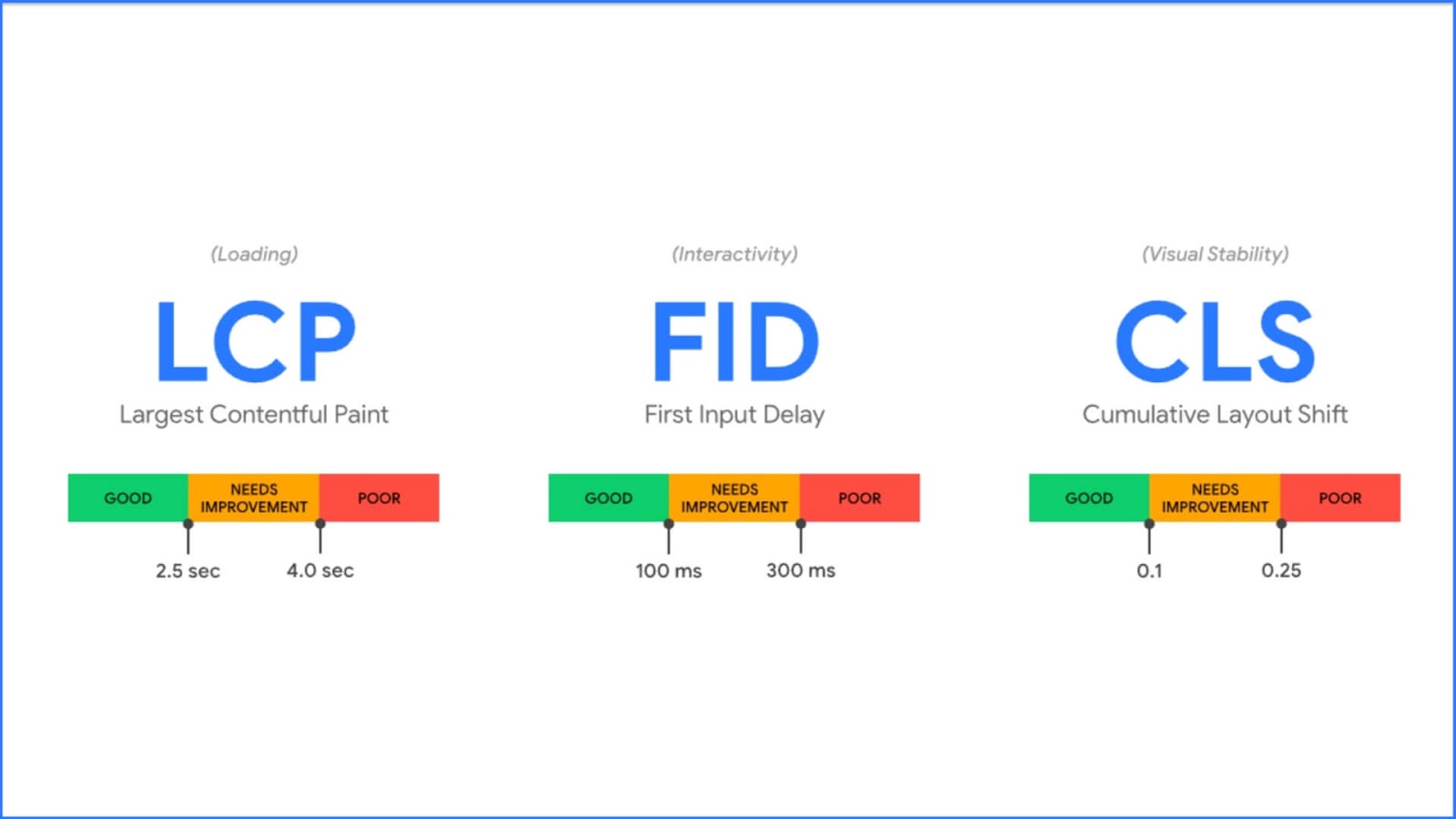
    Google Core Web Vitals are a set of metrics to measure the loading speed, responsiveness and visual stability of a website. These metrics include Largest Contentful Paint (LCP), First Input Delay (FID) and Cumulative Layout Shift (CLS).

    • LCP measures the time it takes for the largest content on a page to be visible. A good LCP is critical to providing a good user experience, as users prefer sites that load quickly and display content in a timely manner.
    • FID measures the response time between a user’s interaction with a website (for example, a click on a button) and the site’s response to that interaction. A low FID is important to ensure that users can interact with the site without annoying delays.
    • CLS measures the visual stability of a web page and indicates whether elements shift while loading, causing a poor user experience. Low CLS is crucial to prevent users from accidentally clicking on moving elements.

    Why is it important?

    Google Core Web Vitals are important for a website because they impact the overall user experience. A well-performing website can improve user engagement, reduce abandonment rates, and increase the time users spend on the site. Google also announced that starting in 2021, Core Web Vitals metrics will be used to rank pages in search results. This means that websites with better performance will rank higher in search results, resulting in increased visibility.

    To surpass the Google Core Web Vitals, website owners must therefore work hard to optimize the performance of their sites. This may include optimizing code, compressing images, using a content delivery network (CDN), and implementing web development best practices. Furthermore, working with a specialized hosting provider to optimize the performance of websites can be an advantage in achieving and maintaining optimal site performance.

    In summary, Google Core Web Vitals are a set of metrics that measure the loading speed, responsiveness and visual stability of a website. They are important for improving user experience, achieving greater visibility in search results and providing a high-quality, performing website.

    How Atuttoyoga.it passed the Core Web Vitals

    To achieve the goal of exceeding the Core Web Vitals, Atuttoyoga.it has partnered with Bhoost.

    We are, in fact, a web hosting provider specializing in optimizing the performance of websites. Through ad hoc consultancy with the customer, we were able to find the best hosting solution which could provide the right performance.

    Thanks to this strategic collaboration, the client was able to obtain a site that had a significant improvement in loading speed and overall user experience.

    One of the first moves undertaken by Atuttoyoga.it to meet the requirements of the Core Web Vitals is the implementation of a content delivery network (CDN) by Bhoost. ThereCDN has allowed this website to distribute its content quickly and reliably to visitors around the world. This significantly contributed to reducing page load times and minimizing downtime.

    The site was created in WordPress and this is why the specific choice of hosting fell on a hosting super veloce per WordPress. In fact, as we have said several times, the speed of a site is a fundamental criterion, be it a normal site or E-Commerce.

    So with our specific hosting for WordPress, we have managed to guarantee excellent performance and speed.

    The Results: Optimization and User Satisfaction

    Bhoost hosting also provided ongoing support to maintain the optimal performance of the online portal. Through constant monitoring and proactive management, Bhoost ensured that the site remained fast and responsive at all times, ensuring smooth navigation for users.

    Thanks to these initiatives and the partnership with Bhoost, Atuttoyoga.it has successfully managed to surpass Google’s Core Web Vitals. This means that the site offers an optimal browsing experience, with fast loading times and excellent usability. The users of this portal can access yoga content and resources quickly and seamlessly, thus improving their overall experience on the site.

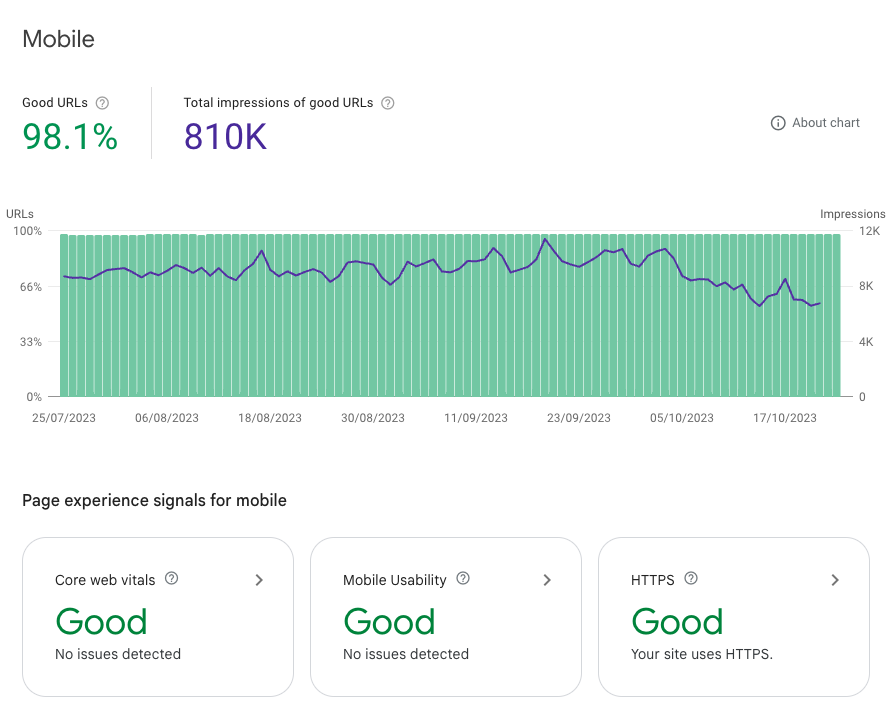
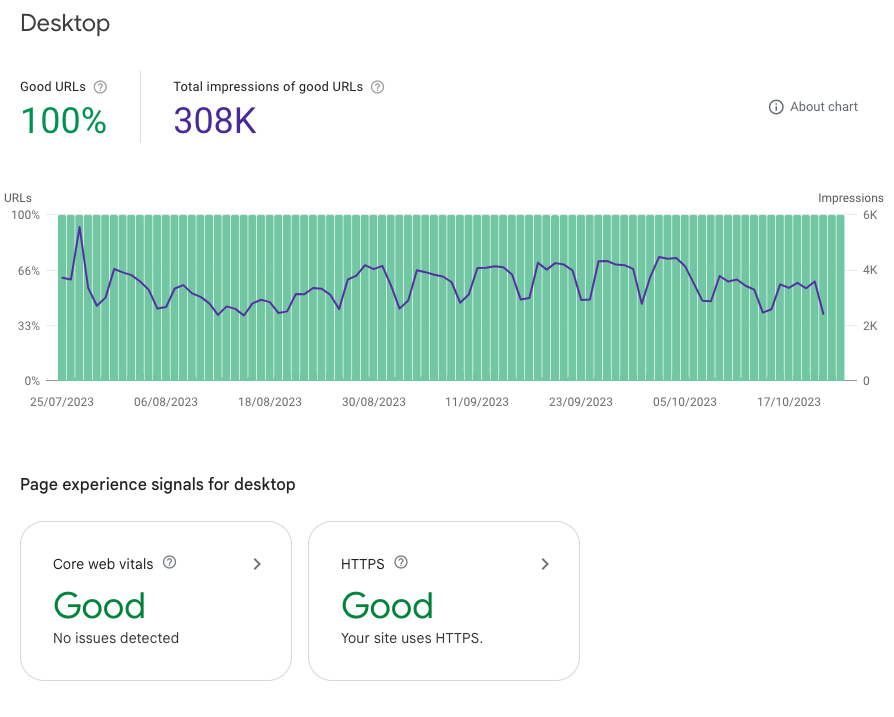
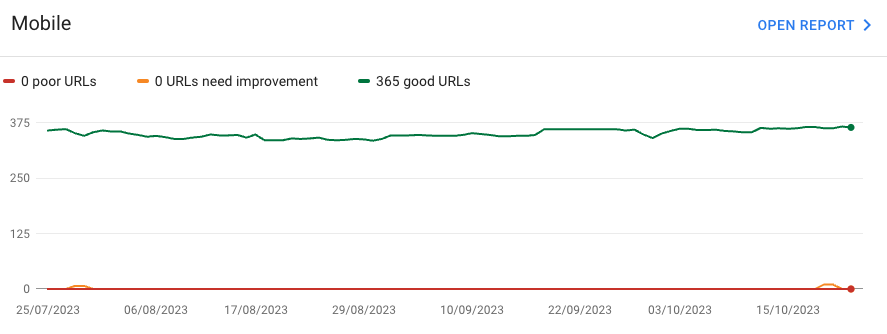
    Below is some data that highlights performance and indications related to usability and Google Core Web Vitals.

    As you can see, both mobile and desktop feedback are completely positive. This is the result of a website that is clearly well-optimized and working effectively. Users are happy with what they see and how the website responds to their actions.

    The website is fast and functional, thanks to WordPress hosting that can handle both traffic and customers. Having a fast site is the key to having an increase in visits and a very low bounce rate.

    Core Web Vitals WordPress hosting
    Core Web Vitals WordPress hosting

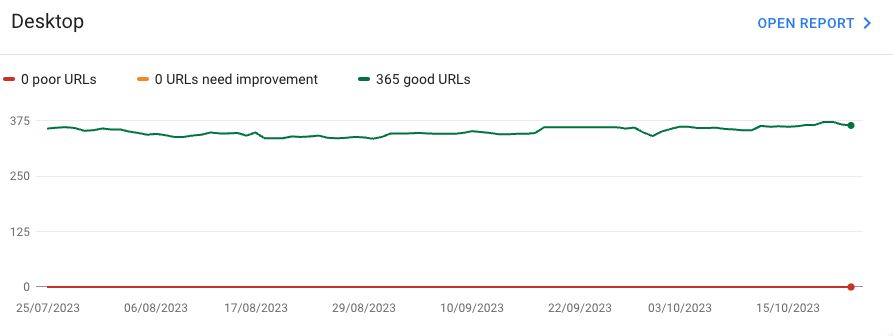
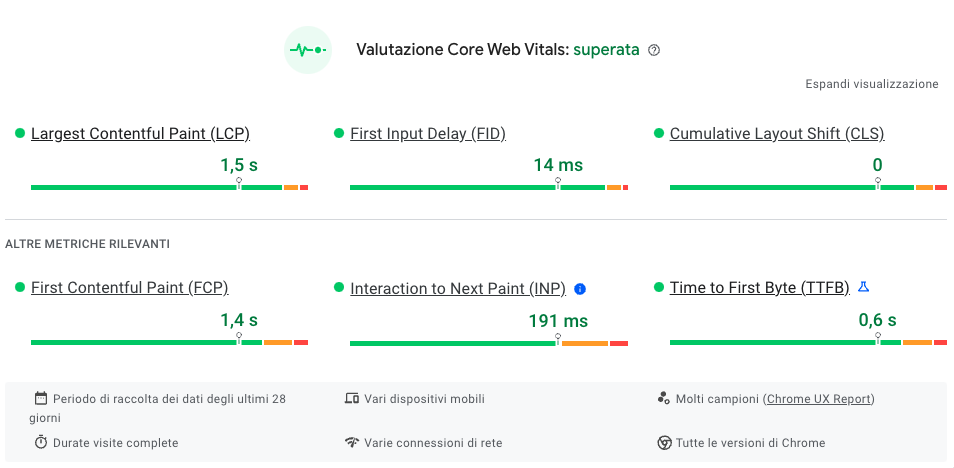
    Below, you can check the results related to the various Core Web Vitals metrics. As you can see, everything is within the acceptable range, and the evaluation is successful.

    This aspect is fundamental for a site, as we have already said in our article, Core Web Vitals: What they are and why they matter to Google. Core Web Vitals have officially become new ranking signals. Essentially, these help Google understand what type of experience the user has on our site, and based on this, it decides whether to penalize or enhance the site.

    This is why it is of fundamental importance to take this aspect into consideration.

    Conclusion:

    In conclusion, if you are looking for a reliable and high-performance online platform for practicing yoga, Atuttoyoga.it is the ideal choice. Thanks to its focus on performance, usability, and partnership with Bhoost, this site continues to be a point of reference in the online yoga sector.

    If you are looking for a truly reliable hosting partner who can help you make your site perform better and live up to Google Core Web Vitals, contact us.

    We will find the most suitable hosting solution for you.

    That’s it, folks! Check out our blog for more information.

    wgl-candles-case-study-magento-hosting
    Reading Time: 7 minutes

    We Got Love Candles (WGL Candles) is a company specialized in the production of handmade and scented candles. The history of this company was born in the lands of Lower Saxony from a friendship. Two very young girls meet at school and have never left each other since.

    Both with a passion for candles, these objects with an ancient flavour, capable of spreading particular aromas and a soft light full of magic. And from that passion a project was born: le candele We Got Love.

    WGL Candles candles are made with natural ingredients and scented with high-quality essential oils. In fact, the company is committed to maintaining high production standards and to supplying unique and high-quality products to its customers.

    Il Partner Interactiv4

    WGL Candles has chosen to partner with Interactiv4 to improve your online presence. Interactiv4 is a digital agency specializing in creating digital marketing strategies and social media management.

    The collaboration between Interactiv4 and WGL Candles has allowed the company to improve its online presence and reach new customers through the use of advanced digital marketing techniques.

    However, this strong duo lacked a fundamental part: a partner who could manage all the hosting and IT infrastructure.

    This is where Bhoost comes into play at this point, with its always safe and performing hosting solutions. And so Interactiv4 and Bhoost decide to establish a partnership, in order to be able to provide the customer with a complete 360° service.

    A competitive company like Interactiv4, has decided to become Partner di Bhoost because he believes in the same values. Performance, speed but not only that, ethics and sustainability too. Attention to the environment is now a fixed point on which large companies focus a lot, because they are aware of how fundamental this aspect is.

    Once the Partnership with us Bhoost was established, Interactiv4 no longer had to worry about the aspects related to the entire IT infrastructure. This has also allowed Interactiv4 to better manage their time, no longer having to worry about the speed and security of their customers’ sites.

    Not to mention that each Partner has the right to a very interesting reserved discount, with which our services can be offered.

    If you are also interested in becoming a Bhoost Partner, visit the page Partner Program di Bhoost!

    Why is WGL Candles different from others?

    WGL Candles differs from other candle companies by using natural ingredients and high-quality essential oils in the production of their handmade candles. The company actively strives to maintain high production standards, ensuring customers receive unique and high-quality products.

    The quality of WGL Candles products is the result of meticulous attention to detail and the choice of the best ingredients. Furthermore, the collaboration with Interactiv4 and the use of Bhoost demonstrate the company’s will to continue to innovate and improve its online presence, in order to reach more and more customers and retain them with high-quality products.

    Why did WGL Candles choose Bhoost?

    The choice of Bhoost by Interactiv4 and WGL Candles demonstrates the will to choose efficient online services, able to provide their customers with a quality user experience.

    In fact, knowing how essential it is for a modern company to have an effective online presence, Interactiv4 wanted to recommend the services of Bhoost to WGL Candles.

    This is because choosing good hosting is essential for the success of an E-Commerce site.

    A site that loads slowly or crashes frequently can lead to lost sales and lost customers. Conversely, a fast and reliable site can improve conversions and customer satisfaction, thus generating more sales.

    For this reason, WGL Candles has decided to rely on us at Bhoost. In fact, we can guarantee optimal performance, scalability and security.

    The choice of this company fell on a Hosting per Magento 2 especially one VPS 4 Core coupled with Hyvä.

    Hyva – A performance optimized Magento 2 theme

    The theme Hyvä for Magento 2 was designed with the aim of improving the frontend performance of your e-Commerce site. The team of Hyvä has been working hard to reduce page load times and increase overall site speed. This was accomplished through the use of advanced caching and asynchronous image loading.

    Also, the theme Hyvä is highly customizable and easy to use for Magento 2 developers. This means you can create a unique and personalized shopping experience for your customers without sacrificing the performance of your site.

    How WGL Candles boosted performance with great Magento and Hyvä hosting

    In addition to the theme used, the hosting chosen for your e-commerce site is another key factor affecting the performance of your site. It is important to choose a hosting provider who has experience with Magento 2 and who offers a solid and scalable infrastructure for your site.

    A good Magento hosting provider should offer:

    • High performance and fast response times
    • Scalability to handle traffic spikes during periods of high activity
    • Advanced security to protect customer data and your business

    Hyvä Theme and Bhoost Hosting: A Powerful Combination

    The theme Hyvä for Magento 2 and good Magento hosting can significantly improve the performance of your e-commerce site. With the theme Hyvä, you can create a personalized and modern shopping experience for your customers without sacrificing the performance of your site. Also, by choosing the right Magento hosting provider, you can ensure that your site has high performance and is safe for your customers. Furthermore, quality hosting can also help ensure that your site is always available and that no interruptions or downtime could harm your business. This is especially important during peak traffic periods, such as holidays or special sales, when your site may receive a high number of visits.

    Just to have the security of a performing, fast and secure site, WGL Candles has decided to rely on Bhoost’s hosting services.

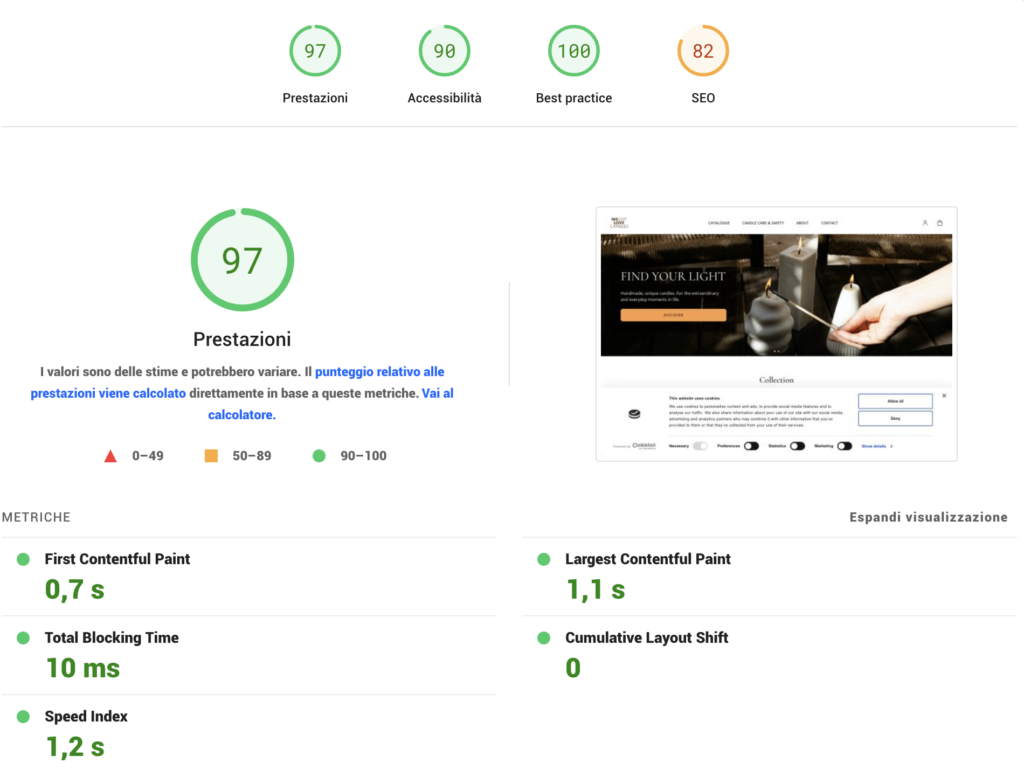
    Below you can see the performance of the site after switching to our hosting services. In particular, it is possible to see the performance linked to the home page and to one of the product pages.

    A good hosting offers a series of features and services to ensure the proper functioning of the site, such as security management, traffic management and technical assistance. In addition, good hosting also offers greater flexibility and scalability, allowing you to handle traffic peaks and grow with your business.

    For these reasons, it is important to choose reliable and quality hosting for your e-commerce site, in order to ensure a positive shopping experience for customers and to maximize sales.

    So if you are looking to improve the performance of your e-Commerce site, seriously consider using Hyvä theme for Magento 2 and choosing one of our high-quality hosting services.

    VPS 4 for Magento the perfect choice for WGL Candles

    After a fruitful call with the customer, we recommended a VPS 4 for Magento to best meet the speed and performance needs.

    Choosing a VPS for Magento can have many advantages for an E-Commerce site. Firstly, a VPS offers greater flexibility and scalability than other types of hosting, which means that your site can handle traffic spikes and grow with your business without performance issues.

    Secondly, a VPS offers greater security than other types of hosting, as each site has its own isolated space and dedicated resources. This means that customer data and information are less exposed to security risks.

    Finally, a VPS offers more control and customization than other types of hosting. This means that site owners can configure the hosting environment according to the specific needs of their Magento site, thereby improving the site’s performance and reliability.

    Overall, choosing a VPS for Magento can be a smart choice for an E-Commerce site looking to improve the performance, security and flexibility of their hosting.

    In addition to the VPS, we have also activated the WAF and CDN services on the site.

    WAF and CDN: Optimizing Security and Performance

    Activating WAF (Web Application Firewall) and CDN (Content Delivery Network) on an E-Commerce site is now essential to improve the security and performance of the site.

    The WAF service protects the site from cyber threats, such as DDoS attacks, SQL injection attacks and cross-site scripting attacks. A WAF analyzes incoming traffic to the site and blocks any cyber attacks before they can do any harm.

    In addition, activating the WAF can also protect the site from web application vulnerabilities, such as software bugs and configuration problems. This means that the site is less exposed to security risks and that customer data is more secure.

    With the CDN, on the other hand, site performance is improved, reducing page loading times and improving the user experience. The CDN works by distributing site content to servers around the world, so that users can access content from the server closest to them geographically. This reduces latency times and improves page loading speed.

    Overall, activating a WAF and CDN on an E-Commerce site is important for improving site security and performance, ensuring a positive shopping experience for customers, and maximizing sales.

    What WGL Candles thinks of Bhoost services

    After a few months of using our services, we wanted to ask WGL Candles for some feedback on our hosting services.

    The feedback from our customers is in fact essential for understanding how our service is going, if the customer is happy and if there are terms for further improvement.

    And so we contacted the ladies of WGL Candles and asked them how they got on with our hosting.

    We are happy to say that the feedback has been totally positive.

    The customers have been very satisfied with their e-commerce speed and the performance of the site in general. In fact, we know how important the speed factor is for a website, especially if it is e-commerce.

    Exceptional Customer Service: WGL Candles also really appreciated the customer service, emphasizing the always very rapid responses to customer requests.

    Customer satisfaction is our top priority at Bhoost. We provide not only high-quality service, but also prompt and friendly support whenever a customer contacts us.

    How has the WGL Candles website improved with Bhoost?

    Hosted by Bhoost, the WGL Candles site has seen a dramatic improvement in performance and security. Choosing Bhoost allowed the company to manage site traffic more efficiently and improve page loading speed.

    Additionally, the implementation of Web Application Firewall (WAF) and Content Delivery Network (CDN) has improved site security and customer data protection.

    Globally, collaboration with Interactiv4 and the use of Bhoost has allowed WGL Candles to improve its online presence and reach more and more customers through advanced digital marketing techniques.

    If you are also looking for a reliable partner who can guarantee reliable, fast and secure hosting services, Bhoost is the right choice for you.

    Bhoost can be your trusted hosting partner.

    Try our hosting now and free for 30 days.

    That’s it, folks! Check out our blog for more information.

    wordpress-speed-optimization
    Reading Time: 4 minutes

    The speed of the website is a critical factor for the user experience and for its positioning on search engines. In particular, for one site, WordPress, speed is even more important since it is a resource-intensive platform to work properly on.

    The user experience

    Website speed has a significant impact on the user experience. A slow site can increase the abandonment rate and reduce user satisfaction. Conversely, a fast site can improve user experience, increase satisfaction, and reduce churn.

    Positioning on search engines

    Website speed is also an important factor for positioning on search engines. Google has stated that website speed is one of the factors it uses to determine placement in search results. Also, fast websites are more likely to be shared on social media, increasing traffic and search engine rankings.

    How do I optimize the speed of a website in WordPress?

    Website speed is critical to user experience and search engine rankings. A fast site increases user satisfaction and reduces the abandonment rate. In this article, we will explore some techniques to optimize the speed of your WordPress website.

    Choose quality hosting

    The choice of hosting is crucial to ensuring the speed of your site. Choose a reliable and fast provider. Also, choose a plan for hosting that is in line with your needs. Quality hosting has powerful and reliable servers, which guarantee a fast and stable connection. Furthermore, quality hosting also offers reliable and fast technical support, which can help you in case of any problems.

    Use a lightweight theme

    A feature-heavy, heavy theme slows down your site. Choose a light theme and clean it to ensure maximum speed. A lightweight theme reduces page load time because it contains only what is necessary for the site to function. Additionally, a lightweight theme is also easier to customize and maintain.

    Use caching plugins

    Caching plugins can greatly optimize the speed of a WordPress website. These plugins create a cached version of your site that is served to users, reducing page load time. Caching plugins can be very effective for websites with static content, such as blogs or e-commerce sites. Using a caching plugin, you can reduce the page loading time of your site, improving the user experience and positioning on search engines.

    Reduce the size of the images

    Images are often the root cause of slow websites. Make sure you use optimized images and reduce their size as much as possible. Images can be optimized in various ways, such as compression or resolution reduction. Also, you can use online tools to reduce the size of images without losing quality.

    Use the CDN

    The CDN (Content Delivery Network) is a network of servers that distribute the content of your site around the world. Using the CDN, your users can access your site from servers closer to them, improving page loading speed. The CDN can be especially useful for websites with users in different parts of the world. Using the CDN, you can reduce the page load time of your site, improving the user experience and positioning on search engines.

    Reduce the number of HTTP requests

    The number of HTTP requests required to load a page affects site speed. Reduce the number of requests by reducing the number of files needed to load the page. You can reduce the number of HTTP requests by deleting unnecessary files or combining similar files. Additionally, you can use techniques like sprite CSS to reduce the number of HTTP requests.

    Use compression

    File compression can greatly reduce file size and improve upload speed. Use compression to reduce the size of HTML, CSS and JavaScript files. File compression can be done using techniques such as GZIP or Brotli. File compression can reduce the loading time of your site’s pages, improving user experience and search engine rankings.

    It uses HTTP/2 technology

    HTTP/2 technology is a new version of the HTTP protocol that was designed to improve the loading speed of web pages. Using the HTTP/2 technology, you can reduce the loading time of your site’s pages, improving the user experience and ranking on search engines.

    Conclusion

    Optimizing the speed of your WordPress site takes time and effort, but the benefits are numerous. A fast site improves user experience and search engine rankings. Use these techniques to ensure maximum speed for your site. Remember that your site’s speed is an important factor in the success of your online business, so don’t overlook it.

    That’s it, folks! Check out our blog for more information.

    🚀 Give your website a boost!
    Try bhoost hosting for free for 30 days