Images are one of the most important elements of a website or e-commerce. However, they can often create some loading and speed issues. The size of the images can have a significant impact on website performance, both in terms of SEO and user experience.
In this article, we will talk about the importance of image size for SEO and for the performance of a website or e-commerce.
The size of the images has a direct impact on the SEO of a website, we have just said this. When the search engine analyzes the image file, it tries to figure out what it is and what the content is. The images with a small size can be analyzed faster, which means that the search engine can understand the image content more accurately. Furthermore, images with reduced dimensions may load faster, which can improve the website speed and then improve SEO.
Images with small dimensions not only affect SEO, but also image search. When people search for images on Google or other search engines, the results appear as thumbnails. If the images are small in size, they can be viewed faster, which can improve the user experience and the likelihood that the user will click on the image thumbnail.
The image size has a direct impact on website performance. Images often represent the bulk of a website’s data, which means that their load can significantly slow down the website. Larger images take longer to load, which can result in a higher website latency.
Also, large images can slow down the page loading speed. If images are not optimized for performance, they can take a long time to load, which can lead to a diminished user experience and an increased likelihood of the user leaving the website.
To optimize images for SEO and performance, there are a few best practices that can be followed. Here are some tips on how to optimize images:
Use a tool image compression to reduce the size of images without losing image quality. There are many online and offline tools available that can help compress images.
Use the right format for pictures. For example, JPEG for photographic images and PNG for images with transparency. Choosing the right format can help reduce the size of your image without compromising its quality.
Reduce the size of the images to a minimum necessary for display on the website. Images should not be enlarged unless necessary. Also, it’s important to remember that the smaller the image size, the faster it can load.
Use the alt text for images in order to accurately describe the content of the image. Alt text can also help improve SEO image and website.
Why is the size of the image important for SEO? Large images can damage SEO and website performance. Following best practices for optimizing images for performance and SEO is essential to ensure a positive user experience and to improve your website’s visibility on search engines.
Also, keep in mind that reducing the size of your images can only be part of the solution to improving website performance. Other factors such as code quality, server speed, and use of a content delivery network can also affect overall website performance.
That’s it, folks! Check out our blog for more information.
We have already talked about Google Core Web Vitals and we highlighted the importance of these metrics for online content. Now let us introduce you to the new metric – INP.
These metrics introduced a few years ago, were designed to communicate important data to Google about the user experience on your site. In essence, this is an evaluation of the user experience.
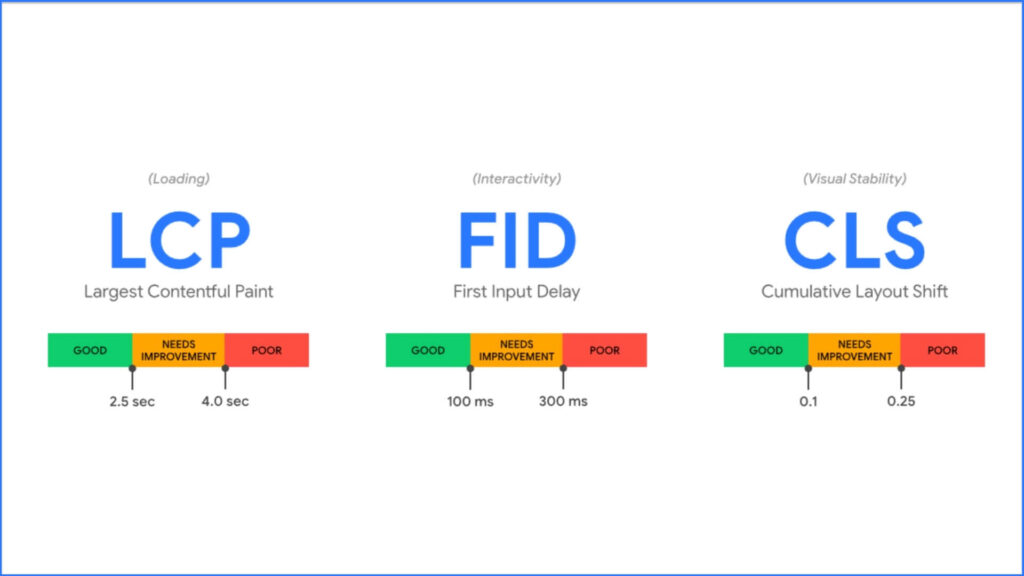
This evaluation was initially made on 3 parameters: LCP; FID and CLS, parameters related respectively to page loading, interactivity and visual stability.
But now things are changing and a new metric, INP, Interaction to Next Paint, is about to be introduced.
Starting in March 2024, the Navigation Performance Index (INP) will become a new official metric in Google’s Core Web Vitals. This is important news for everyone working in the world of web design and web development. The quality of website performance will become even more important for search engine rankings and the user experience.
INP is a metric that measures how quickly the user can interact with the page after it has loaded. In other words, the INP measures the time between the moment the user presses a button or takes an action and the moment the action is performed. This element is crucial because it is a direct measure of website responsiveness.
First, because INP is an important measure of user experience. If a website is slow to respond to user actions, the user may become frustrated and leave the site. Secondly, because INP is a metric that can be easily measured and implemented by website owners.
The fact that INP becomes an official metric in Google’s Core Web Vitals means that website responsiveness will become even more important for search engine rankings and user experience. Additionally, the INP will join other Core Web Vitals metrics currently used by Google, namely page load speed (LCP) and visual stability (CLS).
There are several strategies we can adopt. First, we can reduce page load time. This can be done using image compression techniques, reducing the number of requests to the server and minimizing the HTML and CSS code. Second, we can use caching techniques to reduce server response time. Finally, we may use page pre-loading techniques to improve the responsiveness of the website.
Implementing INP improvement strategies will improve both the website’s position in search engines and the user experience. Indeed, a website that is responsive and quick to respond to user actions increases user satisfaction and reduces the website abandonment rate.
Also, it is important to take into account that INP not only impacts SEO and user experience but also conversion. Recent studies have shown that an increase in INP can lead to a decrease in conversion, as slow and non-responsive browsing can cause the user to lose interest.
For this reason, it is essential to work on reducing the INP of our website as soon as possible, in order to improve not only the position on search engines but also the conversion and user satisfaction.
To know more and better understand all the methods to maximize the INP metric, read on the web.dev “Optimize Interaction Next Paint“.
There are several tools that we can use to measure INP, for example, Lighthouse, a Chrome DevTools tool that allows you to perform an in-depth analysis of website performance. Also, we can use other related metrics like the First Input Delay (FID), to get a complete overview of website performance.
You can also measure the speed of your site with these tools.
Finally, INP is not a static metric; it can vary depending on the user’s device and internet connection. To accurately evaluate a website’s CLS, test its performance across different devices and internet connections.
In conclusion, the INP will become an official metric in Google’s Core Web Vitals starting in March 2024. This means that website responsiveness will become even more important for search engine rankings, user experience and conversion.
It is critical to begin working on lowering our website’s INP using strategies, and tools for measuring INP, and testing website performance on various devices and internet connections. Only in this way can we improve the user experience and achieve our business goals.
If you have run one of the speed tests and your site is slow and/or underperforming, please contact us.
We will find the right solution to make your e-commerce fast and secure.
That’s it, folks! Check out our blog for more information.
A slow site speed not only frustrates visitors but also hinders your search ranking, making it harder for new users to find your website.
In fact, after the introduction of Google Core Web Vitals, which we already talked about a few articles ago, a slow site can be penalized by Google and therefore not be visible in the first search results.
In this article, we’ll look at some of the reasons why site speed is critical to look after.
As we anticipated, in May of 2020, Google announced that “page experience” would soon become a ranking factor in Google Search.
This update has therefore marked a significant turning point, indicating that the performance of a site is now a fundamental discriminator for the visibility of a site.
Google through Core Web Vitals determines how high a particular website should appear in search results.
Several metrics come into play. The LCP, the FID and the CLS. If these metrics are not met, Google will understand that the site is not performing and therefore will make it less visible.
By cons, that means instead faster and better-performing websites see more traffic compared to the slower competition.
In the time since the announcement, Google has continued to release more information about exactly how performance can affect rankings in search.
When it comes to organic search, a slow website will have fewer potential customers.
So, as you can see, it becomes essential to have a fast and performing website.
Once a user enters a website, the performance greatly affects his behaviour, influencing him positively or negatively.
According to a survey of over 700 consumers, nearly 70% of users said that the performance of the website they were browsing affected their likelihood of buying or returning to the website.
In fact, how many times have we found ourselves on a site, perhaps to buy a product? Well, if the site is slow, it also gives us a feeling of inadequacy and above all little reliability. Therefore, in addition to leaving it because it can be frustrating to browse it, a user leaves a site of this also because he thinks it is unsafe. It’s a question of image, if the site works well, is fast and responsive, the user feels more secure and at ease.
The speed of a site, as you can see, is a really important factor for the user experience. This element comes before a good user experience or a good structure.
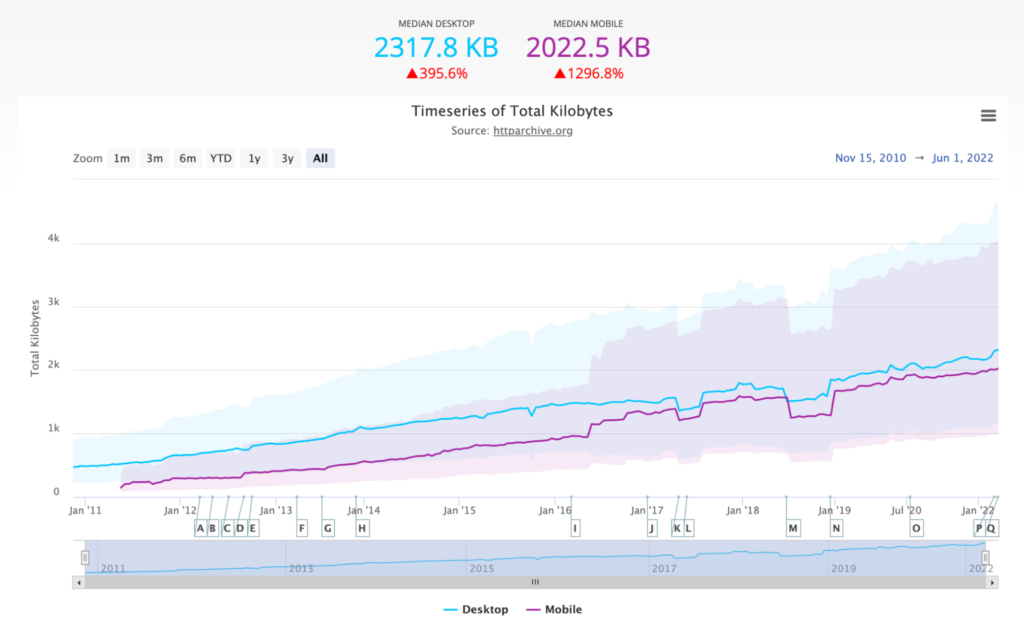
According to data collected from the HTTP archive, page sizes have increased significantly in recent years. Over the past 10 years, the average size of web pages on the desktop web has tripled.
This can cause problems for users who are sensitive to bandwidth consumption. It is true that now many offers from mobile telephone operators offer a minimum of 50 – 100GB, but still why consume more? not to mention that there are areas where the mobile connection is not stable and therefore having a site that loads slowly affects it even more.
Increasing page size may lead consumers to upgrade to larger plans and spend more on mobile data.
A faster website can reduce costs. Images, videos and other media uploaded to the website must be stored somewhere, often with additional backups. In addition to storage space, many cloud service providers also charge for outbound bandwidth when users request a file from your servers.
In practice, the same kind of image optimization that benefits things like Largest Contentful Paint and Cumulative Layout Shift can also reduce the amount of storage space required to house these assets.
A study by CrayonData found that not only optimizing images and uploading them via a CDN has reduced storage costs, but it has also reduced network consumption. This resulted in an 85% reduction in hosting costs, saving over $200,000.
So as you can see, you can save a lot in this sense too.
Well, improving the speed of the website can give you advantages in terms of conversions and costs. A fast website can boost organic traffic, conversion rates, and sales.
Making a website faster for users can require consensus from stakeholders across all teams. It can require you to make difficult decisions about features, functionality, and aesthetics that impact performance. Organizationally, the additional design time and resources required may also require management approval.
Despite these challenges, a fast website has the potential to be discovered and engaged by more users, especially if it’s faster than its competitors. Once users find the website, they are also more likely to interact with it in more depth and eventually convert into customers.
That’s it, folks! Check out our blog for more information.

Do you have an E-Commerce with PrestaShop and want to configure the Facebook pixel quickly and easily? Then don’t miss this useful guide on how to integrate Facebook into PrestaShop.
The first thing to do is to log into your PrestaShop panel. Next, we will have to distinguish two cases:

PrestaShop Facebook
If you have just created your E-Commerce site with PrestaShop, know that Facebook is already integrated within it. You can then access it by going through the form management.
Multiple vulnerabilities in PrestaShop
If you already have a PrestaShop store and the Facebook module is not installed, the process is very similar to before, but with a small difference.
In particular, you will need to:
Alternatively, you can also do this second procedure:
Now you have successfully managed to integrate Facebook into Prestashop.
That’s it, folks! Check out our blog.
Reading Time: 3 minutesPrestashop has quite strict security features and one of these is certainly the duration of the session timeout, which is rather short. This ploy is to reduce your application’s exposure to session-based attacks, such as session cookie theft.
However, this can be quite annoying for anyone who is working with the platform. Store admins may be logged out of the admin interface if they are idle for some time. This can be very frustrating.
Today then I’ll show you why it happens and how to fix this error.
This problem usually occurs when one of these conditions occurs:
Let’s see what are the 3 main reasons why the Prestashop admin login problem occurs.
What you need to know if you want to open an e-commerce with Prestashop
To solve this problem, we mainly use 5 different ways, based on the exact problem the store owner is facing.
But before you get into the details and make any changes to the store, make sure you have the database and website files backed up.
To check this, try to log in from another browser or activate the “Incognito mode”.
The cache files are located in these locations.
Go to these folders and delete all the files in them.
Provide the correct domain name for PS_SHOP_DOMAIN and PS_SHOP_DOMAIN_SSL in the ps_configuration table.
You should only provide the domain name. For example: if your shop URL is http://test.com/store/, you should provide values like:
PS_SHOP_DOMAIN = test.com
PS_SHOP_DOMAIN_SSL = test.com
The installation directory should be indicated in the “ /config/setting.inc.php “ file.
Remove the check of the user’s IP address performed by Prestashop.
You can disable it in the “ classes / cookie.php ” file inside the “ isLoggedBack () “ function.
Here, remove or comment on the following condition:
! Configuration :: get (‘PS_COOKIE_CHECKIP’))
The inactivity period is set to 15 minutes by default.
You can increase this value in the “ classes / controller / AdminController.php “ file.
Find the following code in the file:
if (time $ this-> Context> cookie-> last_activity + 900 <())
Here the inactivity period is set to 900s (15 minutes). You can replace this value in seconds.